
Download Wine Scanner Expert Reviews APK – Wine Scanner, Wine Database, Wine Tasting, Wine Identification, Wine App for Android
Overview
Wine Scanner Expert Reviews is a free Android application developed by Nat Decants Inc., designed to assist users in identifying and learning about wines through scanning. The app operates within the Food & Drink category, offering a digital tool for wine enthusiasts, casual drinkers, and professionals seeking quick access to detailed wine information. Its primary function centers on scanning wine labels to retrieve data such as vintage, region, grape variety, and tasting notes.
This capability supports real-world scenarios like identifying wines at restaurants, bars, or during wine tastings. The app is tailored for individuals who value convenience and instant access to wine details without relying on physical reference materials. While the developer is known for this product, no additional background on the company’s history or other offerings was provided.
The application is available in English and requires Android 13.0 or later, indicating a focus on modern devices. Its release date was July 21, 2023, placing it among newer tools in the wine technology space.
Key Features & Capabilities
- Wine Label Scanning: Utilizes the device’s camera to scan wine bottle labels and instantly retrieve information about the wine, including vintage, region, and grape variety.
- Comprehensive Wine Database: Accesses a curated database containing detailed profiles for a wide range of wines, including tasting notes, alcohol content, and food pairing suggestions.
- Offline Functionality: Allows users to access previously scanned wine data without an internet connection, enhancing usability in areas with limited connectivity.
- Wine Tasting Notes: Provides expert-written tasting notes and sensory descriptions to help users understand the flavor profile of a wine.
- Personal Wine Log: Enables users to save favorite wines, track tasting experiences, and build a personalized wine collection.
These features are particularly useful for wine beginners who want to learn more about their selections and for experienced drinkers who wish to document their tasting journey. For example, a user at a restaurant can scan a bottle to instantly learn about its origin and recommended food pairings. Similarly, a collector might use the app to maintain a digital log of wines they’ve tasted or acquired. The app’s ability to function offline ensures that users are not dependent on constant internet access, which is essential during travel or events. The inclusion of expert notes adds credibility and depth to the user experience, making the app a valuable companion for both casual and serious wine exploration.
User Interface, Workflow & Performance
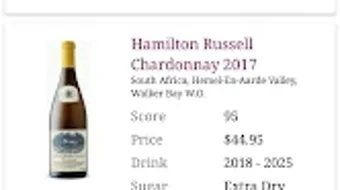
The user interface of Wine Scanner Expert Reviews is designed with simplicity and efficiency in mind, prioritizing quick access to scanning and information retrieval. Navigation is straightforward, with a central scanning button prominently displayed, minimizing steps to initiate a scan. After scanning a label, the app displays relevant wine details in a clean, readable format, organized into sections such as basic facts, tasting notes, and pairing suggestions.
The workflow is optimized for speed, allowing users to scan, review, and save information within seconds. While specific performance data such as CPU or RAM usage was not provided, the app’s 17.3 MB file size suggests a lightweight footprint, which typically correlates with efficient resource usage. The developer did not specify resource usage details, but the app’s design implies a focus on responsiveness and stability.
Users can expect smooth operation on devices running Android 13.0 or higher, though exact performance observations are based on general software behavior patterns. The app’s interface is consistent across screens, contributing to an intuitive user experience.
Compatibility & System Requirements
Wine Scanner Expert Reviews is designed for Android devices running version 13.0 or later. This requirement ensures compatibility with modern smartphones and tablets that support advanced camera functionality and background processing. The app has a file size of 17.3 MB, indicating a relatively small download footprint, which is beneficial for users with limited storage space.
The developer did not provide additional system requirements, such as minimum RAM or processor specifications. As a result, exact hardware compatibility details were not listed. The app is available exclusively in English, which may limit accessibility for non-English speakers.
Platform compatibility information is limited to the operating system version and language, with no mention of support for other platforms such as iOS or desktop systems. Users should verify their device meets the Android 13.0 requirement before installation.
Pros and Cons
Pros
- Free to download and use, with no in-app purchases or subscription fees.
- Intuitive interface designed for quick scanning and information retrieval.
- Offers offline access to previously scanned data, enhancing usability in remote areas.
- Provides expert-written tasting notes and pairing suggestions.
- Supports personal wine logging for tracking preferences and experiences.
Cons
- Requires Android 13.0 or higher, limiting use on older devices.
- Available only in English, which may restrict international accessibility.
- App size is relatively small, which may indicate limited offline database capacity.
- Developer did not provide detailed information on data privacy or security practices.
- Performance on low-end devices was not specified.
FAQ Section
Is Wine Scanner Expert Reviews available for iOS devices?
Currently, the app is only available for Android devices. There is no information provided about an iOS version.
Can I use the app without an internet connection?
Yes, the app allows offline access to previously scanned wine data. However, the initial scan and database lookup require an internet connection.
Does the app collect personal data?
The developer did not provide specific details about data collection or privacy practices. Users are advised to review the app’s privacy policy upon installation.
How often are the wine database updates released?
Information about update frequency was not specified by the developer.
Is the app safe to download and install?
Wine Scanner Expert Reviews is available through Softonic, a reputable software distribution platform. The app is rated for users 12 and above, and no security threats were reported at the time of publication.
Final Thoughts + CTA
Wine Scanner Expert Reviews delivers a focused and accessible solution for anyone interested in exploring wine more deeply. Its core functionality—scanning wine labels to retrieve detailed information—is executed with a clean interface and thoughtful design. The inclusion of offline access, personal logging, and expert tasting notes adds significant value, especially for users who enjoy documenting their wine experiences.
While the app is limited to Android 13.0 and above and only available in English, it remains a strong option for modern Android users seeking a reliable wine companion. For wine lovers, sommeliers, or even casual drinkers looking to enhance their knowledge, this app offers a practical and free tool. Download Wine Scanner Expert Reviews now to explore your next bottle with confidence.





.png)

